

Ergonomics Unlocked: Achieving Correct Sitting Posture at Your Workstation
Why Your Desk Setup Could Be Causing Your Pain
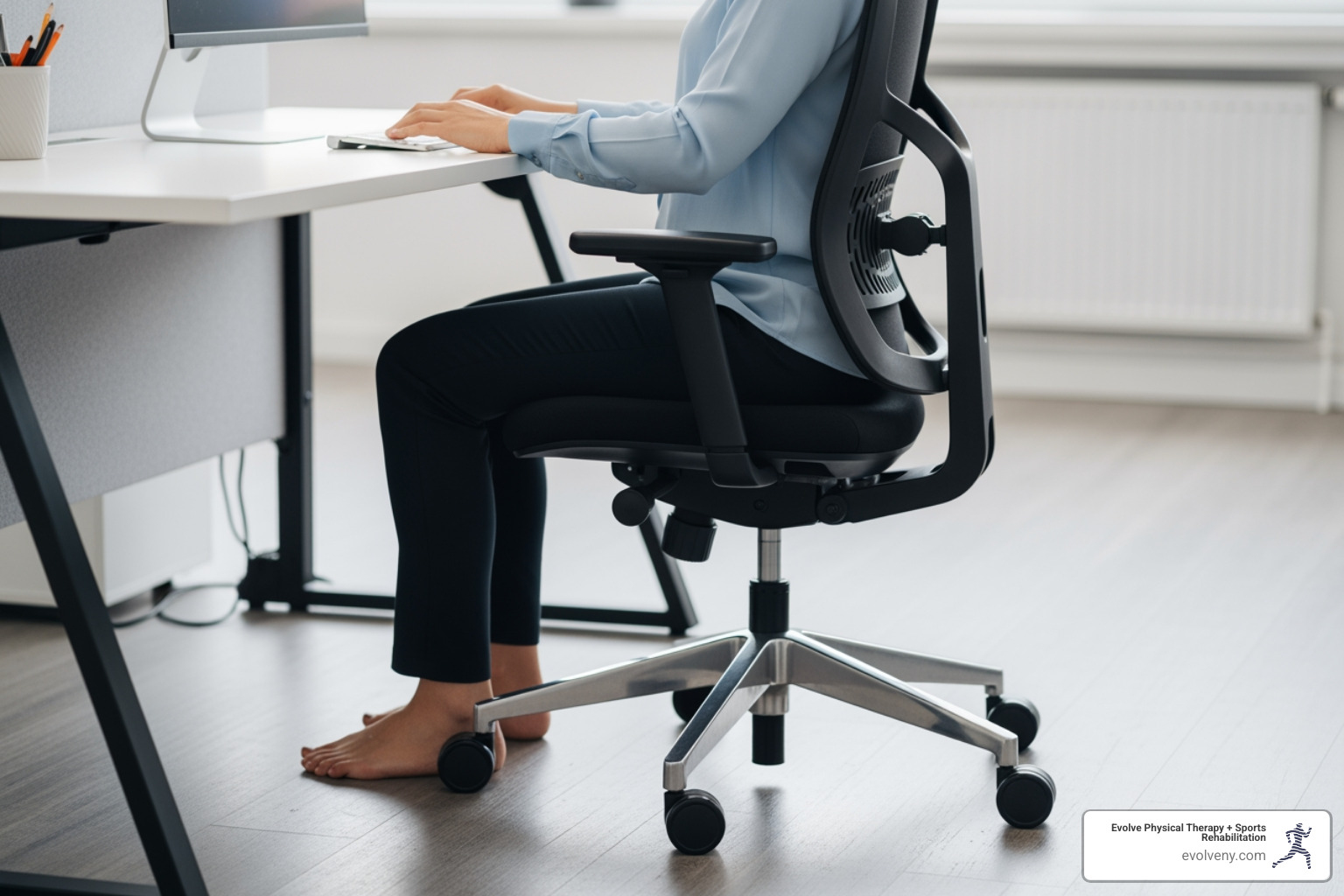
Correct sitting posture at desk starts with neutral body positioning, a comfortable posture where your joints are naturally aligned. This reduces stress on your body and lowers your risk of musculoskeletal disorders.
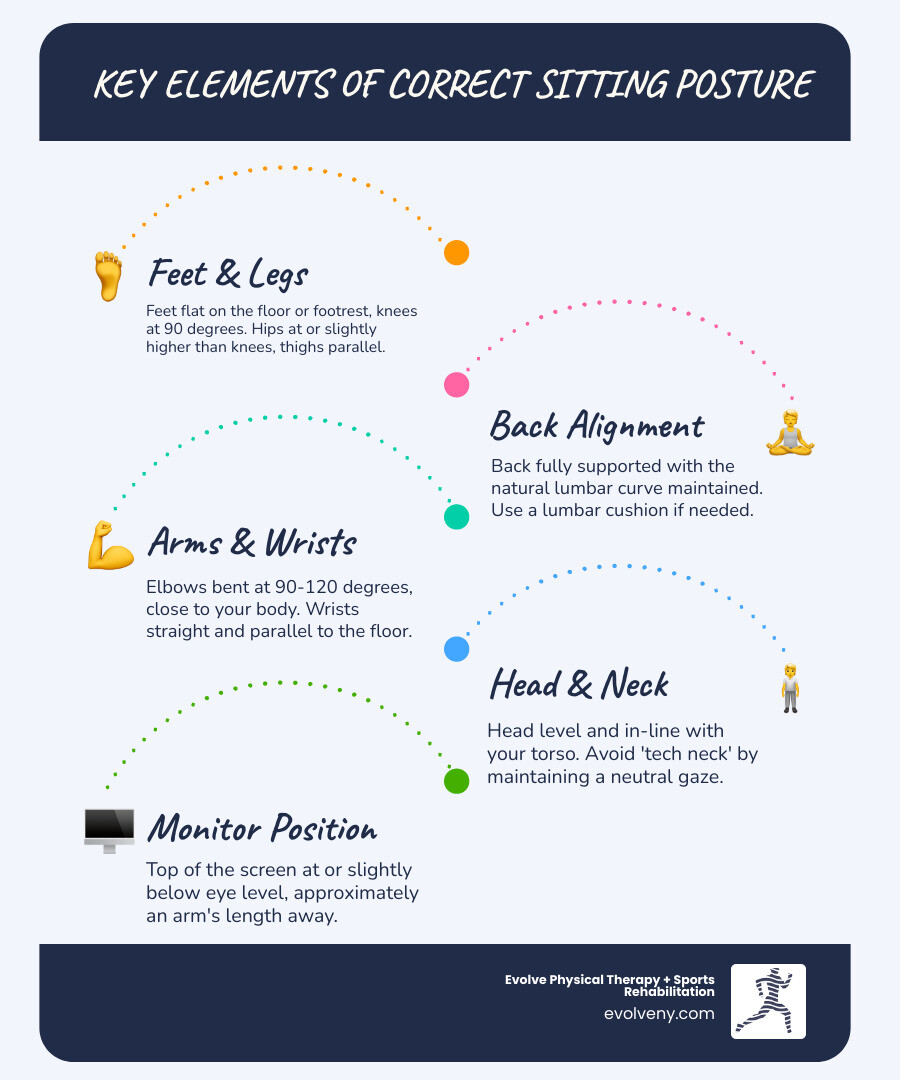
Quick Answer: Key Elements of Correct Sitting Posture
- Feet: Flat on floor or footrest, knees at 90 degrees
- Hips and Knees: At equal height or hips slightly higher, thighs parallel to floor
- Back: Fully supported with lumbar curve maintained
- Elbows: Bent at 90-120 degrees, close to body
- Wrists: Straight and parallel to floor
- Head: Level and in-line with torso
- Monitor: Top at or slightly below eye level, arm's length away
- Movement: Change positions every 30-50 minutes
Prolonged sitting, common in many jobs, increases the risk of diabetes and cardiovascular disease. Sitting adds pressure to your back and spine. For every inch your head moves forward, you add 10 pounds of weight to your neck.
The good news is that small workstation adjustments can make a huge difference.
I'm Lou Ezrick, founder of Evolve Physical Therapy in Brooklyn. For nearly two decades, I've helped thousands of patients with chronic pain from poor ergonomics. Through hands-on treatment and workspace modifications, we've seen remarkable improvements in pain and function.
The following guide breaks down exactly how to set up your workspace for optimal comfort and health.
Why Good Posture Is More Than Just Sitting Up Straight
We've all been told to "sit up straight!" This advice is more than just about appearances; good correct sitting posture at desk is critical to our health, especially for those who sit for long periods.
Our bodies are built for movement, but modern life often involves prolonged sitting, which takes a toll. At our Brooklyn clinics (Marine Park, Gravesend, Midwood, Park Slope, Mill Basin), we see many patients with issues linked to poor posture. The phrase "sitting is the new smoking" is a reality we must address, as highlighted by various scientific research on sitting's health effects.
The Dangers of Prolonged Sitting
Prolonged sitting with poor posture causes more than a stiff neck. Research shows it significantly increases your risk for serious conditions like cardiovascular disease and diabetes. It affects how our bodies function fundamentally.
When we sit for extended periods, our bodies undergo several detrimental changes:
- Increased Pressure on Spinal Discs: Sitting, especially slouching, puts immense pressure on back muscles and spinal discs. This can overstretch ligaments and strain discs, leading to herniations and significant lower back pain.
- Muscle Strain and Imbalances: Prolonged sitting can shorten and tighten hip flexors, which pulls on the lower back. Meanwhile, lower back muscles can weaken, losing strength and stability.
- Nerve Constriction: Poor posture can constrict nerves, causing numbness, tingling, or pain. For instance, it can worsen sciatic pain.
- Organ Compression: Hunching over can compress abdominal organs, leading to poor digestion.
- "Tech Neck" and Head Weight: "Tech neck" occurs when the head juts forward to see a screen. For every inch your head moves forward, an extra 10 pounds of weight is placed on your neck. This highlights the importance of proper monitor placement.
These problems lead to musculoskeletal misalignment, balance issues, and reduced flexibility, which can cause chronic pain and lower quality of life. Learn more in our guide on Bad Office Posture.
The Benefits of Getting It Right
Adopting a correct sitting posture at desk offers benefits beyond comfort. It empowers your body to function optimally and prevents future problems.
- Reduced Wear and Tear on Joints: Good posture aligns bones and joints, reducing abnormal wear on joint surfaces. This helps prevent arthritis and lowers injury risk.
- Prevents Muscle Fatigue: Proper alignment helps muscles work more efficiently, preventing fatigue and strain.
- Decreased Stress on Spinal Ligaments: Good posture minimizes stress on spinal ligaments, protecting them from damage and promoting a stable spine.
- Prevents Abnormal Spinal Positions: Supporting the spine's natural curves helps prevent abnormal positions that cause chronic pain.
- Improved Appearance and Self-Esteem: Good posture contributes to a more confident appearance and can improve self-esteem.
- Improved Energy and Digestion: With organs uncompressed and muscles working efficiently, your body conserves energy. Proper alignment also aids digestion.
Proper posture protects your body, improves physical capabilities, and improves well-being. It's a proactive step toward a healthier, pain-free life. Read more at Posture: What It Is & Why It Matters for Your Health and in our guide on Good Posture for Office Workers.
Your Step-by-Step Guide to Correct Sitting Posture at Desk
Achieving a correct sitting posture at desk is more than just sitting up straight; it's about adjusting your entire workstation to support your body. This ergonomic setup is crucial for preventing discomfort and long-term health issues. We guide our Brooklyn patients through these adjustments to create healthier workspaces.

Let's break down how to optimize your setup. For a comprehensive overview, see our Home Office Ergonomics guide. The Mayo Clinic's Office ergonomics: Your how-to guide also aligns with our recommendations.
Adjusting Your Chair for Foundational Support
Your chair is the foundation of your workstation. Proper adjustment is paramount for supporting your spine and maintaining a neutral posture.
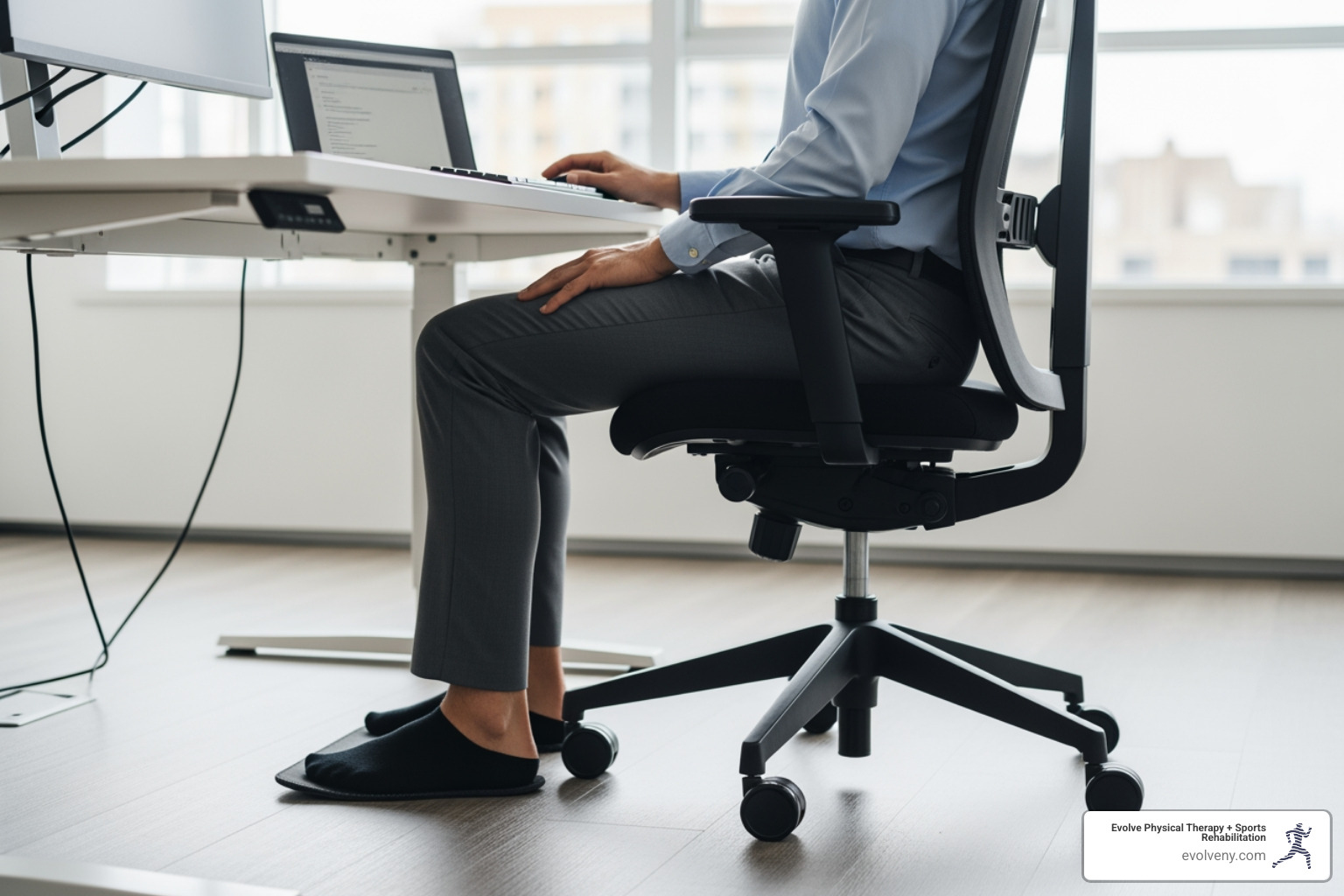
- Feet Flat on the Floor or Footrest: Your feet should be flat on the floor or a footrest. If your feet don't reach, use a footrest to ensure proper circulation and stabilize your lower body.
- Knees at or Slightly Below Hips: Adjust your chair height so your knees are at or slightly below hip level. This maintains your lower back's natural curve and prevents thigh pressure. Aim for a 90-degree knee angle.
- Thighs Parallel to the Floor: Your thighs should be parallel to the floor. Leave a three-finger gap between the back of your knees and the seat's edge to avoid restricting blood flow.
- Lumbar Support: Lumbar support is critical for maintaining your lower back's natural curve. Use your chair's built-in support or add a cushion or rolled towel. This encourages a slight arch, reducing strain on spinal discs.
- Backrest Angle: The backrest should support your entire back. A slight recline of 100-110 degrees can take pressure off your spine.
- Armrest Height: Adjust armrests so your shoulders are relaxed and elbows are close to your body, bent at 90-120 degrees. This reduces neck and shoulder strain. If armrests are in the way, adjust or remove them.
By focusing on these chair adjustments, you create a stable and supportive base for your correct sitting posture at desk.
Positioning Your Monitor to Prevent "Tech Neck"
Your monitor's position plays a huge role in your head and neck posture. An improperly placed monitor is a primary culprit for "tech neck."
- Monitor at Arm's Length: Place your monitor directly in front of you, an arm's length away. This distance prevents eye strain and leaning forward.
- Top of Screen at or Slightly Below Eye Level: The top of the screen should be at or slightly below eye level, so you don't have to tilt your head. If you wear bifocals, you may need to lower it an extra inch or two.
- Monitor Directly in Front: Center your monitor to avoid neck rotation and strain.
- Avoiding Glare: Position your monitor to minimize glare, which causes eye strain and awkward postures. Tilting the screen 10-20 degrees can help.
Chilling statistic: for every inch your head moves forward, there's an extra 10 pounds of weight placed on your neck! Proper monitor placement is one of the most effective ways to combat this. For more detailed guidance on optimizing your computer setup, check out our insights on Correct Computer Posture.
Arranging Your Keyboard, Mouse, and Other Items
Beyond your chair and monitor, the arrangement of your input devices and frequently used items significantly impacts your wrist, arm, and shoulder health.
- Neutral Wrist Posture: Keep your wrists straight and in line with your forearms while typing or using a mouse. Avoid bending them, which can lead to carpal tunnel syndrome. A wrist rest can help if your keyboard is tall.
- Forearms Parallel to the Floor: Your forearms should be parallel to the floor, with elbows bent at 90-120 degrees and close to your body. Hands should be at or slightly below elbow level. Leave 4-6 inches between the keyboard and desk edge for your wrists to rest.
- Mouse Within Easy Reach: Keep your mouse close to your keyboard to avoid reaching. Move the mouse with your arm, not just your wrist, to prevent strain. Higher mouse sensitivity can reduce physical movement.
- Frequently Used Objects Close By: Keep frequently used objects like your phone and notepad within easy reach to minimize twisting and reaching. If something is too far, stand up to get it to prevent strain.
- Headset for Phone Use: Use a headset if you're on the phone often, especially while typing. Cradling the phone between your head and shoulder causes neck and shoulder pain. A headset prevents this and can increase productivity.
- Document Holders: Use an in-line document holder between your keyboard and monitor to keep your neck in a neutral position when viewing papers.
Ignoring these details can lead to workplace injuries like elbow, wrist, and finger pain. Adjusting these elements is crucial for correct sitting posture at desk. For more tips, see our guide on Computer Sitting Ergonomics.
Mastering Neutral Body Positioning from Head to Toe
Neutral body positioning is the cornerstone of correct sitting posture at desk. It involves aligning your body to minimize stress on your musculoskeletal system, reducing the risk of musculoskeletal disorders (MSDs). The goal is a balanced, supported alignment, not rigid perfection.
Achieving the Correct Sitting Posture at Desk: A Body Part Checklist
Here is the ideal alignment for each body part, based on guidance from sources like OSHA's eTools : Computer Workstations - Positions.
- Head and Neck Alignment: Keep your head level and in line with your torso. Tuck your chin slightly to maintain the natural curve of your neck and prevent forward head posture.
- Shoulders Relaxed: Let your shoulders relax and drop naturally, with upper arms hanging at your sides. Avoid shrugging or hunching. Keep elbows close to your body, bent at 90-120 degrees.
- Upper Back Support: Your chair's backrest should support your entire back to prevent slouching and maintain the spine's natural curve.
- Lower Back Curve: Fully support your lower back's natural inward curve with your chair's lumbar support or an added cushion.
- Hips and Thighs Parallel to Floor: Your hips should be level with or slightly higher than your knees, with thighs parallel to the floor. This distributes weight evenly and maintains pelvic alignment.
- Knees and Ankles: Bend your knees at about a 90-degree angle, keeping them level with your hips. Your ankles should be in front of your knees.
- Feet Supported: Your feet must be flat on the floor or a footrest. Dangling feet can restrict circulation and add pressure to your thighs.
By paying attention to these specific alignments, you're achieving a neutral body position that significantly reduces stress on your joints, muscles, and ligaments.
Special Considerations for Laptops and Tablets
Laptops and tablets are ergonomic nightmares if not used correctly for extended periods. Their design forces compromises that lead to "laptop hunch" or "tech neck."
- Risks of "Laptop Hunch": Using a laptop directly on a desk or lap forces you to look down, rounding your shoulders and straining your neck and upper back.
- Using External Keyboards and Mice: For long-term laptop use, an external keyboard and mouse are essential. They allow for a neutral hand and wrist posture.
- Laptop Stands: A laptop stand is essential for raising the screen to eye level, which helps you maintain correct sitting posture at desk for your head and neck.
- Proper Tablet Positioning: Tablets also pose ergonomic challenges. For extended use, use a stand to position the tablet upright at eye level. Tilting the screen back can also minimize neck stress. An external input device can be helpful for fine cursor tasks.
While using a laptop on your lap may seem better for your arms, the resulting neck strain often outweighs this benefit. If you must use it on your lap, raise the screen with a platform, especially if you have neck issues. Our guide on Awkward Posture Ergonomics offers more details.
The Myth of Static Posture: Why Movement is Key
Even with a perfect setup and correct sitting posture at desk, sitting still for long periods is unhealthy. Posture is dynamic, not static. Our bodies are designed for movement, and holding any single posture for hours can cause problems.
Dangers of Static Posture
- Reduced Blood Flow: Static posture reduces circulation, causing muscle fatigue, stiffness, and poor nutrient delivery to tissues like spinal discs.
- Muscle Imbalances: A static position creates muscle imbalances, causing some muscles to tighten while others weaken.
- Increased Spinal Pressure: Even with good posture, constant pressure on spinal discs is detrimental over time.
- Nervous System Adaptation: Your nervous system can adapt to a seated position, making it feel stiff when you stand up.
The solution is to integrate movement into your workday. At Evolve Physical Therapy, we believe movement is medicine. UCLA Health's guide on Ergonomics for Prolonged Sitting also advocates this dynamic approach.
How Often to Take Breaks and What to Do
The key to mitigating the dangers of static posture is frequent movement. Think of it as a series of "micro-breaks" throughout your day.
- Stand Up and Move Regularly: Stand and walk for 1-2 minutes every 30-50 minutes. Take a quick trip to the water cooler, walk to the restroom, or simply stretch. Some tasks can be done while standing.
- The 20/20/20 Rule for Eyes: To combat eye strain, follow the 20/20/20 rule: every 20 minutes, look at something 20 feet away for 20 seconds to relax your eye muscles.
- Simple Stretches During Breaks: Add quick, simple stretches to your micro-breaks. Even small movements make a big difference.
- Neck Rolls: Gently roll your head from side to side, ear to shoulder.
- Shoulder Shrugs: Shrug your shoulders up towards your ears, then roll them back and down.
- Torso Twists: Gently twist your upper body from side to side while seated, keeping your hips stable.
- Wrist Stretches: Extend your arm, palm up, and gently pull your fingers back towards your body. Repeat with palm down.
- Calf Raises/Ankle Pumps: While standing, rise onto your toes. While seated, pump your ankles up and down.
- Mini Squats or Lunges: If space allows, perform a few light squats or lunges to engage your lower body.
These frequent movements improve circulation, reduce stiffness, and reset your body and mind. It's about breaking the static posture cycle. For more ideas, see our Desk Ergonomics Posture Guide.
Common Mistakes That Ruin Your Correct Sitting Posture at Desk
Even with the best intentions, it's easy to fall into habits that undermine your correct sitting posture at desk. Here are some common pitfalls to watch out for:
- Slouching: This common mistake rounds your upper back, flattens your lumbar curve, and pushes your head forward, straining your spine.
- Cradling the Phone: Holding your phone with your shoulder causes neck and shoulder pain. Always use a headset or speakerphone.
- Reaching for Items: Constantly reaching for items strains your shoulders and back. Keep everything within easy reach.
- Crossing Legs: This causes uneven weight distribution and can restrict blood flow. Keep both feet flat on the floor or a footrest. Avoid crossing your legs if possible.
- Dangling Feet: If your feet don't reach the floor, use a footrest. Dangling feet put pressure on your thighs and can cause circulation issues.
- Leaning Forward: Leaning forward from the waist puts pressure on your lower spine. Instead, lean from your hips, keeping your back straight.
By being mindful of these common mistakes, you can reinforce your healthy habits and ensure your efforts towards a correct sitting posture at desk are truly effective.
Frequently Asked Questions about Desk Posture
What are the most important angles for my joints when sitting?
Your hips, knees, and ankles should be at approximately 90 degrees or slightly more open. Your elbows should also be bent at a 90 to 120-degree angle, close to your body.
Can I achieve good posture without an expensive ergonomic chair?
Yes. You can use pillows or rolled towels for lumbar support, a footrest if your feet don't reach the floor, and stack books to raise your monitor. The key is to use your environment to support a neutral posture.
How do I know if my posture is correct if it feels uncomfortable at first?
Correct posture can feel unnatural initially if your muscles are used to slouching. It involves training your body. As your core and back muscles strengthen, the correct posture will become more comfortable and natural.
Conclusion: Take Control of Your Workday Comfort
Achieving a correct sitting posture at desk is a journey. Your body is a dynamic system that needs movement and support. Good posture prevents chronic pain, reduces health risks, and helps you feel more energized and confident.
The goal is consistent awareness and dynamic adjustment, not static perfection. Small changes to your workstation and regular movement breaks make a huge difference, turning a sedentary day into an active one.
At Evolve Physical Therapy + Sports Rehabilitation in Brooklyn, we understand the link between posture, your workspace, and your well-being. Our holistic approach empowers you to prevent pain, not just treat it. If you have persistent pain despite these tips, it may be time for a professional assessment. We offer hands-on treatment and specialized programs to help you heal and strengthen.
Don't let your desk job dictate your health. Take control of your workday comfort and invest in your body's longevity. For a professional assessment of your workstation and posture, explore our Ergonomic Physical Therapy services in Brooklyn. We're here to help you evolve into your healthiest self.
